
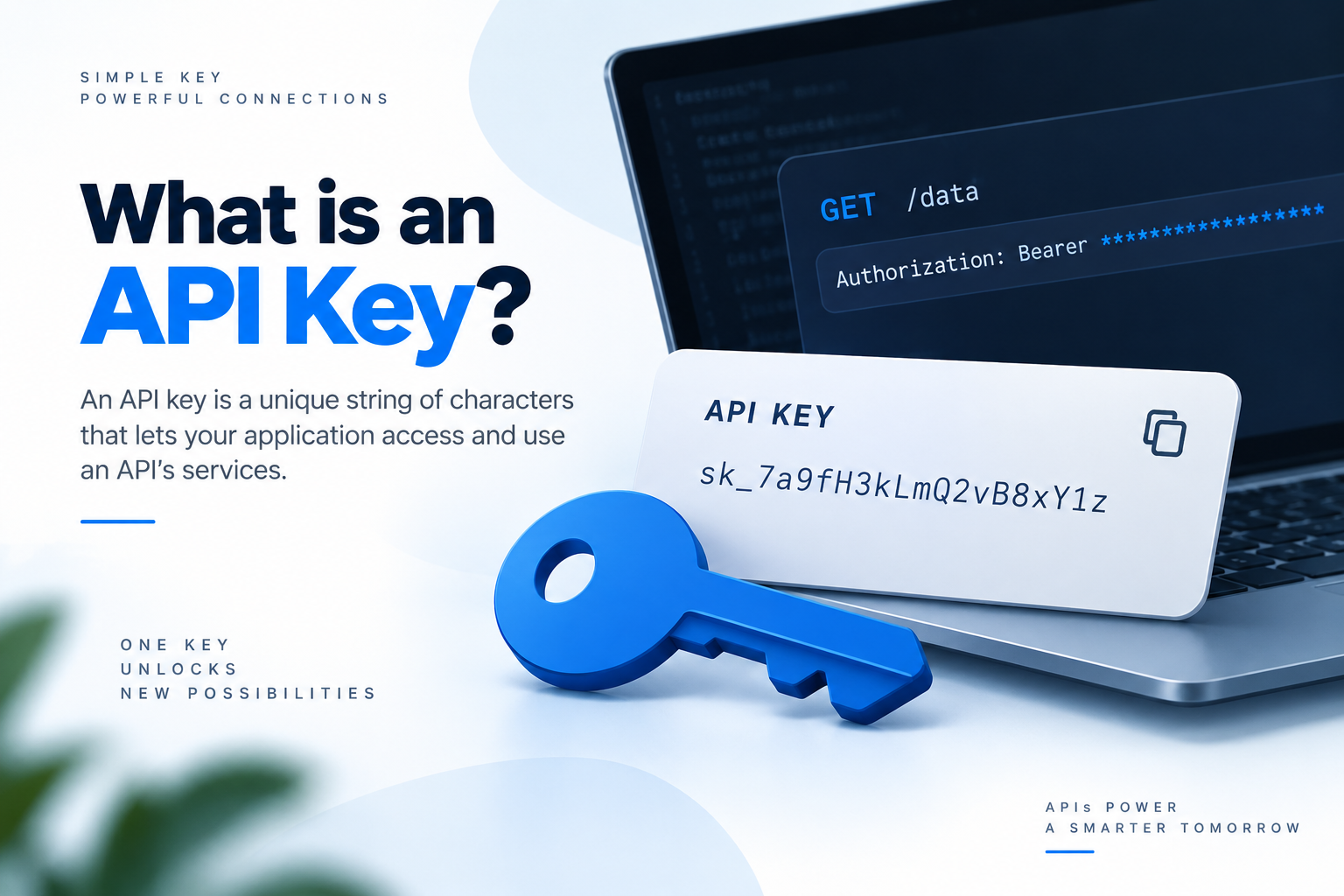
API keys are an important part of modern software development. They allow applications, websites, and software systems to communicate with external APIs and services.
If you are developing a website, mobile application, SaaS product, AI application, payment system, weather application, or any other software, you may eventually need an API key.
An API key can be used to identify your application, control API access, monitor usage, apply rate limits, and connect your application with third-party services.
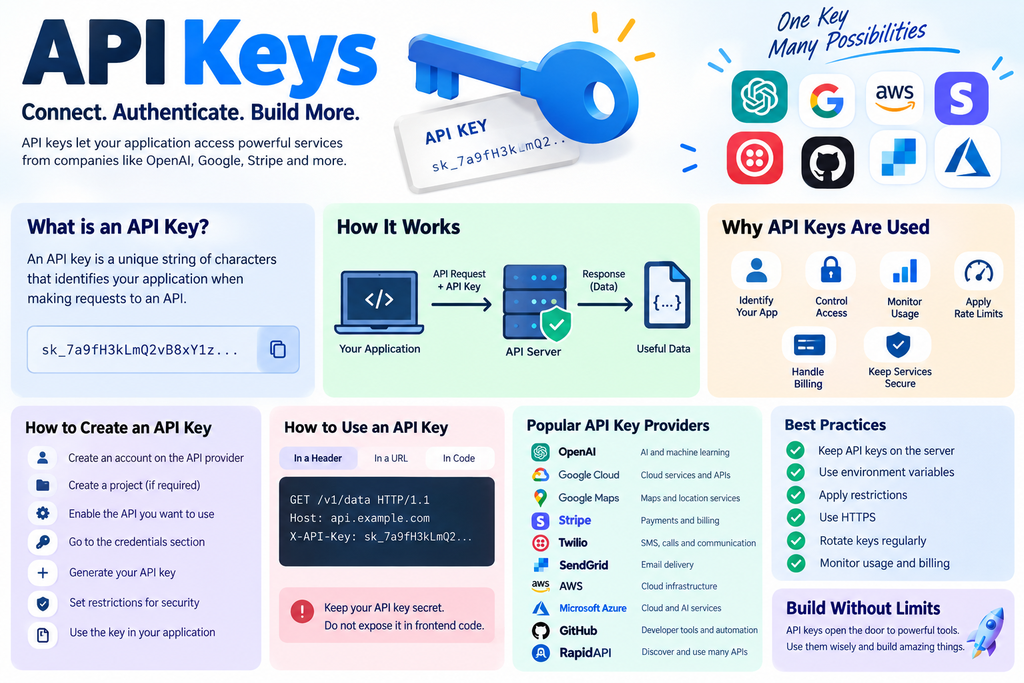
In this complete guide, we will explain what an API key is, how API keys work, how to create an API key, how to use API keys, where to store them, how to protect them, popular API key providers, common API key errors, and frequently asked questions.
What Is an API?
API stands for Application Programming Interface.
An API allows two different software systems to communicate with each other.
For example, suppose you have a website and want to display weather information. You do not need to create your own weather database. You can connect your website to a weather API.
The communication can look like this:
Your Website
↓
API Request
↓
Weather API
↓
Weather Data
↓
Your Website
APIs are used for many different purposes, including:
AI services
Payment processing
Maps
Weather information
Email services
SMS
Social media
Cloud storage
Authentication
Analytics
Databases
Translation
What Is an API Key?
An API key is a unique string of characters that an API provider uses to identify and control access to API requests.
An API key may look something like this:
AIzaSyExample123456789
Another provider may use a completely different format:
sk_example_123456789abcdef
The format depends on the API provider.
When your application sends a request to an API, it may include the API key. The API server checks the key and determines whether the request is allowed.
A simple example looks like this:
Application
↓
API Request + API Key
↓
API Server
↓
Key Validation
↓
API Response
Why Are API Keys Used?
API keys have several important purposes.
Application Identification
An API provider needs to know which application or project is making requests.
The API key can identify your project or application.
Access Control
An API provider can determine whether your key is allowed to use a particular service.
Usage Monitoring
Providers can track how many requests are being made using a particular key.
For example:
Requests Today: 2,450
Daily Limit: 10,000
Rate Limiting
API providers can limit the number of requests a particular key can make.
For example:
100 requests per minute
10,000 requests per day
Billing
Some APIs charge according to usage.
The API key allows the provider to associate API usage with your account or project.
How Do API Keys Work?
The process is relatively simple.
Your application creates an API request.
The request contains the API key in the format required by the API.
The API server receives the request.
The server validates the API key.
The server checks permissions, restrictions, quota, and other conditions.
If everything is valid, the API processes the request.
The API returns a response to your application.
For example:
Your Application
↓
API Request
↓
API Key
↓
API Server
↓
Validate Credentials
↓
Check Permissions
↓
Process Request
↓
Return Response.
Where Can You Get an API Key?
API keys are normally generated through the official developer dashboard of the API provider.
The exact process differs between providers, but it usually looks like this:
Create Account
↓
Create Project
↓
Enable API
↓
Open Credentials
↓
Create API Key
↓
Configure Restrictions
↓
Use API Key
You should always create API keys through the official API provider rather than purchasing keys from unknown websites.
Popular API Key Providers
There is no single company that provides every API. Different companies provide APIs for different services.
Some of the most popular API providers include OpenAI, Google Cloud, Google Maps Platform, Stripe, Twilio, SendGrid, AWS, Microsoft Azure, GitHub, and RapidAPI.
OpenAI API
OpenAI provides APIs for building AI powered applications.
Developers can use OpenAI APIs for tasks such as:
Text generation
AI assistants
Image generation
Speech
Text processing
AI automation
OpenAI provides API credentials that applications use when communicating with its API services.
Secret API keys should be kept private and should not be placed directly in frontend JavaScript.
Google Cloud APIs
Google Cloud provides APIs for many different cloud services.
These include:
Google Cloud Storage
AI services
Translation
Vision
YouTube services
Data services
Google Cloud allows developers to create credentials through its cloud console.
Google Maps Platform
Google Maps Platform provides APIs for maps and location based applications.
Developers can use Google Maps APIs for:
Maps
Places
Geocoding
Routes
Distance calculations
Location search
Google Maps Platform uses API keys to identify requests and control access. API key restrictions can be configured to reduce unauthorized usage.
Stripe API
Stripe provides APIs for online payments and financial functionality.
Stripe can be used for:
Online payments
Subscriptions
Invoices
Customers
Checkout
Payment links
Stripe provides different types of API credentials. Secret credentials should remain on the server and must never be exposed publicly.
Stripe Developers
Twilio API
Twilio provides APIs for communication services.
Developers can use Twilio for:
SMS
Voice calls
Verification
Messaging
Communication automation
Twilio credentials should be stored securely and should not be unnecessarily exposed in frontend applications.
SendGrid API
SendGrid is widely used for sending emails through APIs.
It can be used for:
Transactional emails
Verification emails
Password reset emails
Notifications
Application emails
SendGrid allows developers to create API keys and configure permissions for them.
AWS APIs
Amazon Web Services provides APIs for a huge range of cloud services.
Popular AWS services include:
Amazon S3
Amazon EC2
AWS Lambda
Amazon DynamoDB
CloudFront
AWS generally uses IAM credentials and other authentication mechanisms rather than a simple API key for many of its services.
Microsoft Azure APIs
Microsoft Azure provides APIs for cloud computing, storage, databases, AI, networking, monitoring, and many other services.
Azure supports multiple authentication methods depending on the service, including API keys for services that support them.
GitHub API
GitHub provides APIs that developers can use to automate and interact with GitHub.
GitHub APIs can be used for:
Repositories
Issues
Pull requests
Users
Organizations
Projects
GitHub commonly uses personal access tokens, GitHub Apps, and other authentication methods rather than traditional API keys.
RapidAPI
RapidAPI is an API marketplace where developers can discover and use APIs from different providers.
RapidAPI can be useful for finding APIs related to:
Weather
Sports
News
Finance
Entertainment
Travel
Data
It provides a centralized platform for discovering and testing many APIs.
Best API Provider for Different Purposes
| Purpose | Popular Provider |
| AI | OpenAI |
| Maps | Google Maps Platform |
| Cloud Computing | AWS |
| Cloud AI and Services | Microsoft Azure |
| Payments | Stripe |
| SMS and Communication | Twilio |
| SendGrid | |
| GitHub Automation | GitHub |
| Finding APIs | RapidAPI |
The best API provider depends on what you are trying to build.
How to Create an API Key
The exact process depends on the provider, but the general method is similar.
Create an Account
Visit the official website of the API provider and create an account.
Some services may require payment information before certain APIs can be used.
Create a Project
Some providers require you to create a project.
For example:
My Website
or:
My AI Application
Enable the API
Some platforms require you to enable the API you want to use.
For example:
Maps API
Places API
Translation API
AI API
Storage API
Open the Credentials Section
Look for options such as:
Credentials
API Keys
Developer Settings
Authentication
Security
Generate the API Key
Click the option to create a new API key.
The platform will generate a unique credential.
Save it securely.
How to Use an API Key
There are several ways APIs accept API keys.
The correct method depends on the API documentation.
API Key in a Header
A common method is an HTTP header.
X API Key: YOUR_API_KEY
Another API may use:
Authorization: Bearer YOUR_API_KEY
The exact format depends on the API.
API Key in a URL
Some APIs allow keys to be included as query parameters.
However, this method can expose credentials through URLs, logs, browser history, and other systems. If the API supports authentication through headers, that is often preferable.
Using an API Key in JavaScript
A simple example is:
const API_KEY = “YOUR_API_KEY”;
fetch(“https://api.example.com/data”, {
headers: {
“X-API-Key”: API_KEY
}
})
.then(response => response.json())
.then(data => {
console.log(data);
});
However, this can be dangerous if the JavaScript runs in a user’s browser.
Visitors can inspect frontend JavaScript and network requests.
Therefore, do not place secret API keys directly inside frontend JavaScript.
Using an API Key in Node.js
Node.js applications can use environment variables.
For example:
API_KEY=your_secret_api_key
Then your application can read it:
const apiKey = process.env.API_KEY;
The API request can then use the key.
This keeps the secret separate from the application source code.
Using an API Key in PHP
PHP applications can retrieve an API key from an environment variable.
$apiKey = getenv(“API_KEY”);
You can then send the key through cURL:
$ch = curl_init(“https://api.example.com/data”);
curl_setopt($ch, CURLOPT_HTTPHEADER, [
“X-API-Key: ” . $apiKey
]);
curl_setopt($ch, CURLOPT_RETURNTRANSFER, true);
$response = curl_exec($ch);
curl_close($ch);
echo $response;
This is generally safer than writing the secret directly into your PHP source code.
Where Should API Keys Be Stored?
Secret API keys should be stored in a secure location.
For development, environment variables are commonly used.
For example:
API_KEY=your_secret_key
For larger production systems, a dedicated secrets management system can provide additional security.
What Is a .env File?
A .env file is commonly used to store environment variables during development.
Example:
API_KEY=your_secret_api_key
DATABASE_PASSWORD=your_password
Your application can read these values when it runs.
The .env file should normally be included in .gitignore:
.env
This helps prevent it from being accidentally committed to a Git repository.
Should API Keys Be Stored in GitHub?
Secret API keys should not be committed to a public GitHub repository.
For example, avoid:
const API_KEY = “sk_secret_123456”;
Instead, use an environment variable.
If a secret key is accidentally uploaded to GitHub, assume that it has been exposed.
What If an API Key Is Leaked?
If a secret API key becomes publicly visible, take action immediately.
Revoke the old key
Generate a new key
Update your application
Check API usage
Check billing
Review logs
Remove the exposed credential from your code and repository where appropriate
Simply deleting the visible key from the latest version of a repository may not be enough because it could remain in previous commits.
Can API Keys Be Restricted?
Yes.
Many API providers allow you to restrict API keys.
Common restrictions include:
IP address restrictions
Website restrictions
Application restrictions
API restrictions
Permission restrictions
For example, you may create a key that can only be used from your production server.
Why Are API Key Restrictions Important?
Suppose someone obtains your API key.
If the key has no restrictions, the attacker may be able to use it from another computer or server.
If the key is restricted, unauthorized requests may be blocked.
Restrictions therefore provide an additional layer of security.
API Keys and HTTPS
Always use HTTPS when communicating with APIs that require credentials.
HTTPS encrypts the communication between the client and server.
However, HTTPS does not make an exposed frontend API key secret.
If the key is included in browser JavaScript, users can still inspect the application and potentially obtain it.
API Key vs Password
An API key and password are both credentials, but they are generally used differently.
A password is normally associated with a human user’s account.
An API key is commonly associated with an application, project, or API client.
For example:
Password
User → Login
API Key
Application → API
API Key vs Access Token
An API key usually identifies an application or client.
An access token commonly represents permission to access specific resources.
Modern applications may use access tokens, OAuth, JWT, or other authentication systems instead of traditional API keys.
API Key vs OAuth
API keys are relatively simple credentials.
OAuth is an authorization framework that allows applications to access resources on behalf of users without directly handling the user’s password.
For example, an application may use OAuth when it needs permission to access a user’s account or data.
What Is API Authentication?
Authentication answers the question:
Who is making this API request?
An API key can be used as an authentication credential depending on the API.
Application
↓
Credentials
↓
API Server
The server validates the credentials before processing the request.
What Is API Authorization?
Authorization determines what an authenticated application or user is allowed to do.
For example, an API credential might allow an application to:
Read Products
Create Orders
but not:
Delete Users
Change Account Settings
Authentication and authorization are different concepts.
API Rate Limits
Most APIs have rate limits.
A provider might allow:
100 requests per minute
If your application sends too many requests, the API may return:
429 Too Many Requests
Your application should handle rate limit errors properly.
API Quotas
A quota defines how much of an API service can be used during a particular period.
For example:
10,000 requests per day
After reaching the quota, additional requests may fail until the quota resets or additional capacity is provided.
Common API Key Errors
401 Unauthorized
A 401 error commonly indicates a problem with authentication credentials.
Possible causes include:
Missing API key
Invalid API key
Expired key
Revoked key
Incorrect authentication format
403 Forbidden
A 403 error commonly means the server understood the request but the credential does not have permission to perform the requested action.
Possible causes include:
Insufficient permissions
API restrictions
IP restrictions
Account restrictions
429 Too Many Requests
A 429 error usually indicates that the application has exceeded a rate limit or quota.
Can API Keys Be Decoded?
Usually, there is nothing useful to decode.
Many API keys are randomly generated credentials.
For example:
a83hf72k29x91m…
The important thing is whether the key is valid.
If someone obtains a valid secret API key, they may be able to use it without needing to decode it.
Can Someone Steal an API Key?
Yes.
API keys can be exposed through:
Public repositories
Frontend JavaScript
Screenshots
Application logs
Server logs
Configuration files
Browser storage
Accidental sharing
Insecure servers
This is why secret credentials should be carefully protected.
How to Test an API Key
You can test an API using tools such as:
Postman
cURL
Insomnia
Python
PHP
JavaScript
For example:
curl -H “X-API-Key: YOUR_API_KEY” https://api.example.com/data
Always replace the example key with your actual credential locally.
Never publish the real credential in tutorials, screenshots, or public repositories.
API Keys in Postman
Postman is a popular tool for testing APIs.
You can create a request and configure authentication according to the API documentation.
For example:
Method: GET
URL:
Header:
X API Key: YOUR_API_KEY
Send the request and inspect the API response.
API Keys in WordPress
WordPress websites can use APIs through plugins or custom PHP code.
For example, a WordPress plugin can make a server side request to an external API.
A safer architecture is:
Visitor
↓
WordPress
↓
Server Side API Request
↓
Secret API Key
↓
External API
The secret key does not need to be sent to the visitor’s browser.
API Keys on Shared Hosting
If you are using shared hosting, you can usually store credentials through your application’s server configuration or environment variables, depending on what your hosting provider supports.
For a PHP website, the basic architecture is:
Website
↓
PHP
↓
Server Environment
↓
API Key
↓
External API
Make sure secret configuration files cannot be downloaded directly through the browser.
Development API Keys and Production API Keys
It is good practice to separate development and production credentials.
For example:
Development
API_KEY=development_key
Production
API_KEY=production_key
This prevents development applications from unnecessarily using production credentials.
API Key Rotation
API key rotation means replacing an existing API key with a new one.
A typical process is:
Create New Key
↓
Update Application
↓
Test Application
↓
Revoke Old Key
Rotation can reduce the risk associated with old or compromised credentials.
Best Practices for API Key Security
Keep secret API keys on the server.
Use HTTPS.
Use environment variables or a secrets manager.
Do not publish secret keys on GitHub.
Do not put secret keys in frontend JavaScript.
Use separate keys for development and production.
Apply IP, domain, application, or API restrictions where available.
Give credentials only the permissions they need.
Revoke unused credentials.
Rotate compromised credentials immediately.
Monitor API usage.
Monitor unexpected billing.
Do not share credentials through public messages or screenshots.
Follow the API provider’s official security recommendations.
Frequently Asked Questions About API Keys
What is an API key in simple words?
An API key is a unique credential that allows an application to identify itself when communicating with an API.
Why do APIs require API keys?
API providers use keys to identify applications, control access, monitor usage, enforce quotas, apply rate limits, and associate API usage with accounts.
How do I get an API key?
Create an account with the API provider, open its developer or credentials dashboard, create a project if required, enable the required API, and generate a credential.
Are API keys free?
It depends on the API provider. Some APIs offer free usage limits, while others charge according to the number of requests or amount of data used.
Can I create my own API key?
Yes. If you are developing your own API, you can create an API key system for your users or applications.
Is an API key the same as a password?
No. Both are credentials, but passwords are normally used for human authentication while API keys are commonly used by applications and API clients.
Is an API key a secret?
Some API keys are designed to be public, while others are secret. Always follow the API provider’s documentation. If the provider calls a credential secret, treat it as confidential.
Can I put an API key in JavaScript?
Only if the provider specifically says that the key is safe for frontend use. Secret API keys should not be placed in browser JavaScript.
Can I put an API key in HTML?
A secret API key should not be placed in HTML because anything delivered to the browser can potentially be viewed by users.
Can I put an API key in CSS?
No. CSS is publicly delivered to browsers and is not a secure place for secret credentials.
Where should I store my API key?
For server applications, environment variables or a secure secrets manager are common choices.
Should API keys be stored in a database?
It depends on your application. If user specific credentials must be stored, use appropriate encryption and access controls. For basic application configuration, environment variables or secrets management are often better.
Is it safe to store an API key in .env?
A .env file is commonly used for local development, but it is not automatically secure. Protect the file and make sure it is not committed to Git or exposed through the web server.
Should I upload .env to GitHub?
No. Add .env to .gitignore so it is not accidentally committed.
What happens if my API key is exposed?
Someone may be able to use the credential according to its permissions. This could result in unauthorized API usage, quota consumption, data access, or unexpected charges.
What should I do if my API key is leaked?
Immediately revoke or rotate the exposed credential, generate a replacement, update your application, and check usage, logs, and billing for suspicious activity.
Can API keys expire?
Yes. Some providers support expiration dates, while others keep keys active until they are manually revoked.
Can API keys be restricted?
Yes. Many API providers support restrictions based on IP addresses, websites, applications, APIs, permissions, or other conditions.
Can I use the same API key for multiple websites?
Some providers allow this, but using separate credentials for different applications is generally better because it improves security, monitoring, and credential management.
What is a public API key?
A public API key is a credential that the provider specifically designs to be exposed in a client side application. You should confirm this with the provider before exposing any key.
What is a secret API key?
A secret API key is a confidential credential that should remain protected and should generally be used from server side code.
What is an API key header?
An API key header is an HTTP header used to send an API credential with a request.
For example:
X API Key: YOUR_API_KEY
The exact header name depends on the API.
What does 401 mean in an API?
A 401 response commonly indicates that the authentication credentials are missing, invalid, expired, or not accepted.
What does 403 mean in an API?
A 403 response commonly means that the request was understood but the credential does not have permission to perform the requested action.
What does 429 mean in an API?
A 429 response generally means that the application has exceeded a rate limit or API quota.
What is API key rotation?
API key rotation is the process of replacing an old API credential with a new credential and disabling the old one.
Why should API keys be rotated?
Rotation reduces the amount of time that an old or potentially compromised credential remains usable.
Should development and production use the same API key?
It is generally better to use separate credentials for development and production.
Can someone see my API key in browser developer tools?
If a secret key is sent to the browser, users may potentially see it through developer tools, source code, network requests, browser storage, or other client side mechanisms.
How can I hide an API key from website visitors?
Keep the secret credential on your backend. The frontend communicates with your backend, and your backend communicates with the third party API.
Is HTTPS enough to protect an API key?
No. HTTPS protects data while it is transmitted, but it does not protect a secret that has already been exposed in frontend code, logs, repositories, or screenshots.
Can API keys be hacked?
A valid API key does not necessarily need to be cracked. If an attacker obtains the actual credential, they may be able to use it directly.
Can I use API keys in PHP?
Yes. PHP applications commonly use API credentials when communicating with external services. Secret credentials should preferably be stored outside the source code.
Can I use API keys in Node.js?
Yes. Node.js applications can use API keys through environment variables, configuration systems, or secrets managers.
Can I use API keys in Python?
Yes. Python applications can send API credentials using libraries such as requests, depending on the API’s authentication requirements.
Can I use API keys with WordPress?
Yes. WordPress plugins and custom PHP code can communicate with external APIs using API credentials.
Can API keys be used for payment APIs?
Yes. Payment providers such as Stripe provide API credentials for communicating with payment services. Payment systems may also use additional security mechanisms depending on the operation.
Which is the best API key provider?
There is no single best provider for every purpose. OpenAI is popular for AI, Google Maps Platform for maps, Stripe for payments, Twilio for communication, SendGrid for email, AWS for cloud services, and RapidAPI for discovering APIs from different providers.
Can I buy API keys online?
You should generally create API credentials directly through the official provider. Buying credentials from unknown sellers can expose you to stolen accounts, revoked credentials, security problems, and unexpected access issues.
Can an API work without an API key?
Yes. Some APIs are public and do not require authentication. Other APIs may use OAuth, access tokens, JWTs, signed requests, or other authentication methods.
Do all APIs use API keys?
No. API keys are only one authentication mechanism. APIs can also use OAuth, JWT, session authentication, mutual TLS, signed requests, and other security methods.
What is the difference between an API and an API key?
An API is the interface that allows software systems to communicate. An API key is a credential that can be used to identify or authorize an application when making API requests.
What is the difference between an API endpoint and an API key?
An API endpoint tells the application where and what to request. An API key provides a credential that the API can use to identify or authorize the requester.
What is the safest way to use an API key?
Keep secret credentials on the server, use HTTPS, apply restrictions, limit permissions, separate development and production credentials, monitor usage, and rotate credentials when necessary.
Conclusion
API keys are an essential part of many modern applications. They allow software to communicate with external APIs while giving providers a way to identify applications, control access, monitor usage, enforce quotas, and manage billing.
Popular providers such as OpenAI, Google Cloud, Google Maps Platform, Stripe, Twilio, SendGrid, AWS, Microsoft Azure, GitHub, and RapidAPI provide APIs for different types of applications.
Creating an API key is usually straightforward. The more important part is using and protecting it correctly.
The most important rule to remember is simple:
Never expose a secret API key in frontend code.
For a secure application, the preferred architecture is:
User
↓
Frontend
↓
Your Backend
↓
Secret API Key
↓
Third Party API
↓
API Response
↓
Your Backend
↓
Frontend
Once you understand API keys, authentication, authorization, API endpoints, rate limits, quotas, environment variables, and credential security, you can safely integrate a wide range of third-party services into your websites and applications.