Claude AI has become a popular tool for writers who want to create high-quality content faster. From blog posts and essays to emails and marketing copy, Claude can help you write, edit, and improve your content with less effort.
One reason writers prefer Claude is its ability to produce natural-sounding text, follow detailed instructions, and work with long documents. However, many beginners do not get the best results because they use Claude like a search engine instead of treating it as a writing partner.
In this guide, you will learn how to use Claude AI for writing, create effective prompts, improve your drafts, and prepare content for publication.
What Is Claude AI?
Claude is an AI assistant developed by Anthropic. You can access it through the official website at claude.ai, as well as supported mobile and desktop applications.
Claude can help with various writing tasks, including:
• Blog writing: Create articles, outlines, introductions, and conclusions.
• Editing and rewriting: Improve grammar, sentence structure, and readability.
• Email writing: Draft professional emails, cover letters, and business messages.
• Creative writing: Develop stories, characters, and creative ideas.
• Technical writing: Explain complex concepts and prepare documentation.
• Content planning: Generate topic ideas, headlines, and frequently asked questions.
For bloggers and content creators, Claude can be particularly useful for organizing ideas, developing article outlines, and improving existing content.
How to Create a Free Claude AI Account
Getting started with Claude is straightforward. Follow these steps to begin writing.
- Visit the official website at claude.ai.
- Sign up using an available registration method.
- Complete the onboarding process.
- Open a new conversation.
- Enter your first writing prompt and review the response.
The free plan is a reasonable starting point for beginners who want to explore Claude’s writing capabilities. Usage limits and available features may vary, so check the official website for current details.
Understand Claude’s Writing Strengths
Before creating your first prompt, it helps to understand where Claude can be useful.
| Writing Task | How Claude Can Help |
| Blog posts | Develop structured, readable articles |
| Essays | Organize arguments and improve clarity |
| Emails | Draft professional messages |
| Creative writing | Develop stories and creative ideas |
| Marketing copy | Suggest headlines and promotional text |
| Technical documentation | Explain concepts and organize instructions |
| Content editing | Identify repetition and improve readability |
The quality of the results depends on your instructions, the information you provide, and how carefully you review the output.
Give Claude Enough Context
One of the most common mistakes beginners make is giving Claude a vague instruction.
For example, asking it to write about productivity does not explain who the article is for, what problem it should solve, or how the content should be presented.
Weak prompt:
Write an article about productivity.
This prompt provides very little direction, so the response may be too general.
Better prompt:
Write a 1,200 word blog post for remote workers who struggle with morning focus. Explain five practical, evidence based strategies they can use to improve concentration. Use a friendly, conversational tone, short subheadings, and simple language. Include actionable examples and finish with a relevant call to action. Do not invent statistics or research findings.
The improved prompt tells Claude exactly what you need.
When creating a writing prompt, include these details:
• Audience: Who will read the content?
• Purpose: What should readers learn or accomplish?
• Tone: Should the writing be professional, friendly, or conversational?
• Structure: Should the content include headings, lists, tables, or FAQs?
• Length: How long should the article be?
• Accuracy requirements: Which claims or facts need verification?
Providing this context helps Claude generate content that better matches your expectations.
Use a Reliable Prompt Structure
A well structured prompt can make your writing workflow more consistent. Instead of giving Claude a single sentence, explain the task in detail.
You can use this simple formula for almost any writing project:
Role: Describe the type of writer Claude should act as.
Task: Explain what you want it to create.
Audience: Identify the people who will read the content.
Goal: Describe what readers should learn.
Style: Specify the tone, vocabulary, and sentence length.
Format: Explain how the content should be organized.
Length: Provide an approximate word count.
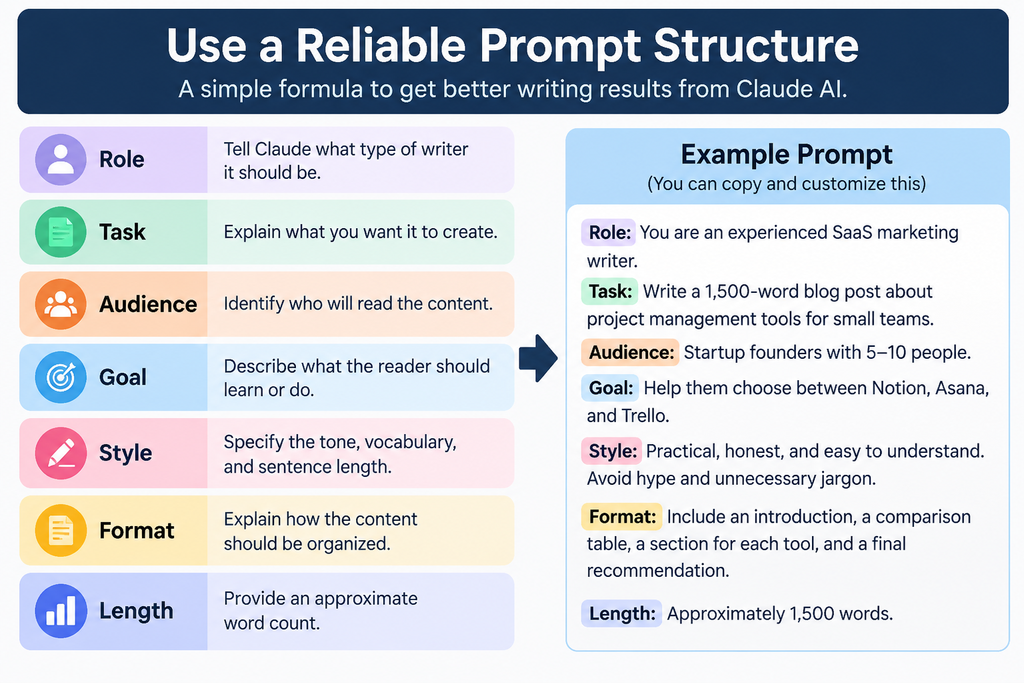
For example, if you are writing a comparison article about project management software, your prompt could be:
Act as an experienced SaaS content writer. Create a comparison style blog post about project management tools for small teams. The target audience is startup founders managing teams of five to ten people. Compare Notion, Asana, and Trello based on their main features, ease of use, and suitability for small teams. Use a practical and balanced tone without exaggerated claims. Include an introduction, a comparison table, separate sections for each tool, and a final recommendation. Verify current product details before making factual claims.
You can adapt this structure for SEO articles, product comparisons, educational guides, and website content.
Write Articles in Stages
Although Claude can generate a complete article in one response, writing in stages often gives you more control over the final result.
Follow this workflow to improve your writing process:
Step 1: Generate an outline
Ask Claude to create a detailed outline with logical headings and relevant subtopics.
Step 2: Review the outline
Remove unnecessary sections, add missing information, and make sure the structure matches the reader’s search intent.
Step 3: Write individual sections
Ask Claude to draft each section separately. Review the information before moving to the next section.
Step 4: Write the introduction
Once the main body is complete, ask Claude to create an introduction that accurately reflects the article’s content.
Step 5: Create the conclusion
Summarize the main lessons and provide a relevant next step for readers.
Step 6: Review the complete article
Check the structure, accuracy, readability, and consistency of the entire draft.
For example, you can use this prompt:
Create a detailed outline for an SEO friendly article titled “How to Improve Website Speed.” Include the main search intent, logical headings, practical examples, and frequently asked questions. Do not write the full article yet. First, present the outline for review.
This approach makes editing easier and reduces unnecessary repetition.
Edit Claude’s Draft Before Publishing
Claude can produce a useful first draft, but the first version should not automatically become your final article.
Review the draft carefully and improve it using this checklist:
• Add original insights: Include your own experience, opinions, or practical examples.
• Remove repetition: Delete paragraphs that repeat information without adding value.
• Improve clarity: Replace vague statements with specific explanations.
• Verify facts: Check statistics, dates, technical details, and product claims.
• Check the tone: Make sure the article matches your website’s writing style.
• Improve readability: Use short paragraphs, descriptive headings, and lists where appropriate.
• Remove unnecessary content: Focus on answering the reader’s question rather than reaching a word count.
If you publish content on a website, make sure the article provides genuine value instead of simply repeating information already available elsewhere.
Use Claude to Improve Existing Content
Claude is not limited to generating new text. It can also help improve articles, emails, essays, and other documents you have already written.
You can use it to:
• Tighten paragraphs without changing their meaning.
• Rewrite complicated explanations in simpler language.
• Identify weak arguments or missing information.
• Improve transitions between sections.
• Suggest alternative headlines.
• Find repetitive words and phrases.
• Adjust the tone for a particular audience.
A useful editing prompt is:
Review the following article as an experienced editor. Identify vague explanations, repeated ideas, awkward sentences, and missing information. Explain the most important problems first. Do not rewrite the entire article yet. Preserve the original meaning and suggest practical improvements.
This method allows you to evaluate the feedback before accepting changes.
Use Projects for Recurring Writing Tasks
If you regularly create content for the same website or business, Claude’s Projects feature may help you organize your work.
Depending on the current plan and available features, Projects can provide a dedicated workspace for related conversations, reference materials, and project instructions.
For example, a blogger could organize the following materials in a project:
• Website writing guidelines.
• Target audience information.
• Preferred tone and vocabulary.
• Examples of previously published articles.
• Research notes and relevant reference documents.
You can then instruct Claude to follow those guidelines when working on new content.
This can improve consistency across multiple articles and reduce the need to repeat the same instructions. Always review new drafts to ensure they follow your requirements.
Best Claude AI Writing Prompts for Beginners
The following prompts can help you handle common writing tasks more efficiently.
Generate Blog Introductions
Use this prompt when you have a title but need a stronger opening.
Write five alternative introductions for an article titled “[Insert Title].” Make each introduction engaging and relevant to the target audience. Use a different approach for each version, such as a practical problem, an interesting question, or a relatable situation. Avoid exaggerated claims and unnecessary background information.
Improve Blog Headlines
A clear headline helps readers understand what an article offers.
Review the headline “[Insert Headline].” Suggest ten improved alternatives that are clear, specific, and relevant to the search intent. Keep them concise, avoid clickbait, and explain which option best matches the article.
Create a Frequently Asked Questions Section
Frequently asked questions can address problems readers may still have after reading an article.
Read the article below and identify eight relevant questions that readers may still have. Answer each question in two or three sentences using clear language. Avoid repeating information already explained in detail. Do not invent facts or present assumptions as verified information.
Remove Repetitive Language
Repetitive words and phrases can make an article feel mechanical.
Review the following draft for repeated words, predictable sentence patterns, and unnecessary phrases. Suggest natural alternatives while preserving the meaning and tone. Do not replace simple words with complicated vocabulary merely to make the writing sound different.
Optimize an Article for SEO
Claude can help organize an article around a target keyword and related search intent.
Act as an experienced SEO content editor. Review the following article for search intent, topical coverage, heading structure, readability, and missing information. Identify opportunities to improve the article without keyword stuffing or unnecessary length. Do not invent search volume, keyword difficulty, ranking data, or competitor findings. Clearly distinguish verified information from suggestions.
Remember that Claude’s SEO recommendations do not guarantee search rankings. Use reliable keyword research tools and current search results to validate your content strategy.
Common Claude AI Writing Mistakes to Avoid
Beginners often get disappointing results because they expect Claude to understand requirements they have not explained.
Avoid these common mistakes:
• Using vague prompts: Include the topic, audience, purpose, and format.
• Publishing the first draft: Review the content, verify facts, and add original insights.
• Requesting too much content at once: For complex articles, use an outline and write individual sections.
• Ignoring clarification questions: Provide missing details when Claude asks for them.
• Failing to refine the output: Give precise instructions about what needs improvement.
• Trusting every factual claim: Verify important information independently, especially when writing about technology, finance, health, or current products.
Avoiding these mistakes will help you produce content that requires less unnecessary editing.
Claude AI Free vs Paid for Writing
Claude’s free plan can be sufficient for beginners who want to experiment with prompts, write occasional articles, and improve existing content.
A paid plan may be worth considering if you regularly work with long documents, need higher usage limits, or rely on additional features for recurring projects.
Here is a simple comparison:
Free plan
• Suitable for beginners learning AI writing.
• Useful for occasional articles and editing tasks.
• A practical way to test Claude before paying.
Paid plan
• May offer higher usage limits.
• Can provide access to additional models or features, depending on the current plan.
• May be more useful for people who write regularly.
Rather than upgrading immediately, begin with the free plan and evaluate how often you use Claude and whether its limitations affect your workflow.
Check the official Claude website for current subscription prices and plan comparisons before making a decision.
Frequently Asked Questions
Is claude AI good for blog writing?
Yes. Claude can help create blog outlines, draft sections, improve readability, and edit existing articles. The final quality depends on the prompt, the available information, and the editing you perform before publication.
Can Claude write SEO articles?
Yes. You can provide a target keyword, search intent, related topics, and an outline to guide Claude’s writing. However, you should verify keyword research independently, add original value, and check factual claims before publishing.
Is Claude better than ChatGPT for writing?
Both tools can assist with writing, editing, brainstorming, and content organization. The better option depends on your task, preferred writing style, available features, and workflow. Test both tools with the same prompt to compare their results.
Does Claude generate plagiarized content?
Claude generates responses based on learned patterns and the context provided, but you should not assume every output is guaranteed to be unique. Review the content, cite sources where appropriate, and use suitable originality checking tools when necessary.
Can beginners use Claude AI for free?
Yes. Beginners can start with Claude’s free plan, subject to current availability and usage limits. You can learn prompt writing, draft articles, and practice editing without immediately purchasing a subscription.
Can Claude write an entire blog post?
Yes. Claude can draft an entire blog post from a detailed prompt. For longer or more complex articles, developing an outline and writing section by section can make it easier to maintain accuracy, structure, and consistency.
Final Thoughts
Learning how to use Claude AI for writing is not simply about finding the perfect prompt. It is about developing a repeatable process that combines clear instructions, thoughtful editing, and independent fact checking.
Treat Claude as a capable writing assistant rather than a replacement for your judgment.
To get the best results:
• Give Claude a clear and detailed brief.
• Build complex articles in stages.
• Request specific improvements instead of vague revisions.
• Verify factual claims before publication.
• Add original examples and insights that make your content useful.
Start with one article today. Create an outline, review the draft, improve the weak sections, and verify the facts before publishing. With practice, you can develop a faster and more consistent writing process without sacrificing content quality.