The gaming industry is growing rapidly, creating exciting opportunities for people who want to turn their passion for video games into a career. Games like GTA 5, GTA 6, Cyberpunk 2077, and Super Mario have inspired millions of people around the world. But have you ever wondered how these games are created? More importantly, have you ever thought about creating your own game?
The good news is that you do not need to work at a major gaming company to start developing games. With the right programming skills, game engines, and consistent practice, you can begin building your own games from scratch.
This guide explains everything you need to know about becoming a game developer, from learning programming fundamentals to creating, optimizing, and publishing your first game.
Understanding the Gaming Industry
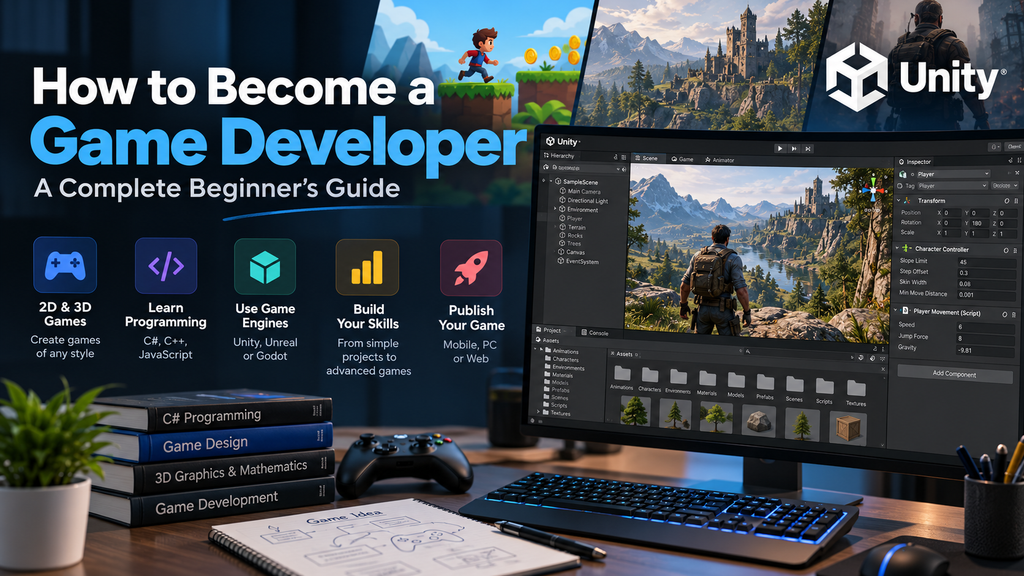
Game development is an exciting field that combines programming, creativity, mathematics, graphics, sound design, and problem-solving. It includes everything from simple mobile games to complex open-world experiences.
The gaming industry offers several career opportunities, including game programmer, gameplay developer, technical artist, game designer, graphics programmer, and independent game developer.
Your earning potential depends on your skills, experience, location, employer, and the projects you complete. You can work for a gaming company, develop games independently, or eventually establish your own game development studio.
However, becoming a professional game developer requires patience and continuous learning. Starting with small projects is usually more effective than immediately attempting to build a game as complex as GTA.
What Are the Different Types of Games?
Before choosing a game engine or learning a programming language, you should understand the two major categories of games: 2D and 3D.
2D Game Development
Two-dimensional games use graphics that primarily operate along the horizontal and vertical axes. They are often simpler to develop and can run on devices with limited hardware resources.
Popular examples include platformers, puzzle games, arcade games, and classic side-scrolling adventures.
One major advantage of 2D development is that beginners can focus on fundamental concepts such as player movement, collision detection, scoring systems, and level design without immediately dealing with complex 3D graphics.
You can create 2D games for mobile devices, desktop computers, and web browsers.
3D Game Development
Three-dimensional games use objects and environments with depth, allowing players to explore more realistic or immersive virtual worlds.
Games such as GTA 5, Cyberpunk 2077, and many modern action-adventure titles use 3D environments.
Developing 3D games generally involves additional challenges, including lighting, materials, animation, camera systems, physics, and performance optimization.
If your goal is to create open-world games, realistic environments, or advanced action games, learning a professional 3D game engine is an excellent starting point.
Learn Programming Before Developing Games
Programming is one of the most important foundations of game development. It allows you to control characters, create gameplay mechanics, implement artificial intelligence, manage inventory systems, and build interactive environments.
If you are a complete beginner, start by learning basic programming concepts rather than immediately attempting to create a complicated game.
Important concepts include:
- Variables and data types
- Conditional statements
- Loops and iteration
- Functions and methods
- Classes and objects
- Basic debugging techniques
- Object-oriented programming
Which Programming Language Should You Learn?
Your choice of programming language depends on the type of games you want to create.
C# for Unity: C# is widely used in Unity game development. It is a practical choice for beginners who want to create 2D or 3D games for mobile devices, computers, and other platforms.
C++ for Unreal Engine: C++ is commonly used in Unreal Engine development, especially for gameplay systems that require more direct control over performance and engine functionality.
JavaScript for browser games: JavaScript is useful for developing games that run directly in web browsers. You can use it with HTML5 Canvas and game development frameworks or libraries.
GDScript for Godot: Godot provides GDScript, a beginner-friendly scripting language with syntax similar to Python.
You do not need to master every programming language before starting game development. Choose one that matches your preferred game engine and learn it through practical projects.
Choose the Right Game Engine
A game engine is a software development environment that provides tools for rendering graphics, handling physics, managing assets, creating animations, and building interactive gameplay.
Using a game engine saves you from implementing every low-level system yourself, allowing you to focus on designing and building your game.
Unity
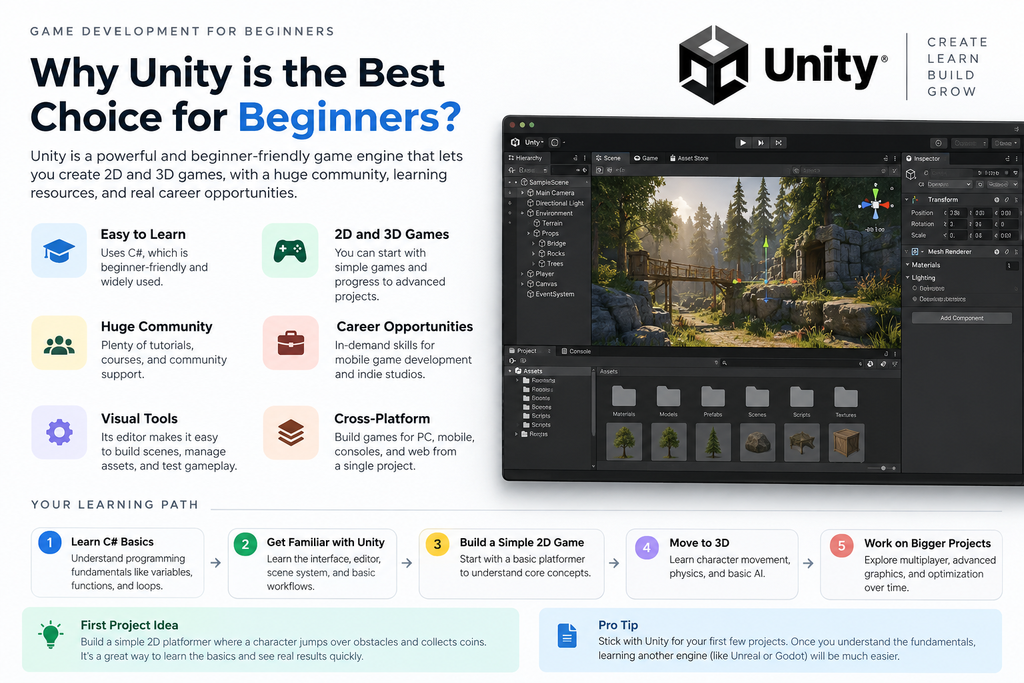
Unity is a popular game engine used to develop 2D and 3D games. It is particularly useful for mobile games, indie projects, and cross-platform development.
Unity primarily uses C# for scripting and provides tools for physics, animation, user interfaces, lighting, and asset management.
It is a strong choice if you want to create Android games, casual games, platformers, simulation games, or 3D action games.
Unreal Engine
Unreal Engine is widely known for its advanced rendering capabilities and powerful tools for creating detailed 3D environments.
It uses C++ for programming and includes a visual scripting system called Blueprints. Blueprints allow developers to build gameplay logic using interconnected visual nodes, making it possible to prototype many features without writing extensive code.
Unreal Engine is particularly attractive for realistic environments, high-quality visual experiences, and large-scale 3D projects.
Godot
Godot is a free, open-source game engine that supports both 2D and 3D development.
It offers GDScript, C#, and other development options, depending on the project and platform. Godot is particularly appealing to beginners and independent developers who want an accessible tool without engine subscription fees or revenue-based royalties.
Unity vs. Unreal Engine vs. Godot
| Feature | Unity | Unreal Engine | Godot |
| Main scripting option | C# | C++ and Blueprints | GDScript and C# |
| 2D development | Excellent | Supported | Excellent |
| 3D development | Excellent | Excellent | Supported |
| Visual scripting | Available through supported tools | Blueprints | Visual scripting availability depends on extensions and workflow |
| Licensing | Plan-dependent | Royalty terms may apply | Free and open-source |
| Good starting point | Mobile and indie games | Advanced 3D games | Independent and smaller projects |
All three engines can produce successful games. The best option depends on your project requirements, hardware, learning preferences, and long-term goals.
Before choosing an engine, review its current licensing terms. Unity plans and Unreal Engine royalty conditions can change, so verify the latest official requirements before publishing a commercial game.
Start with Small Game Development Projects
One of the biggest mistakes beginners make is trying to create a large open-world game before understanding the basics.
Instead, build small projects that teach you specific skills.
You could begin with a simple platformer, a 2D endless runner, a basic racing game, a top-down shooter, or a puzzle game.
For example, an endless runner teaches you player movement, obstacle spawning, collision detection, scoring, and increasing difficulty. These concepts can later be reused in more advanced projects.
Once you complete a small game, gradually add features such as sound effects, menus, saved progress, improved animations, and additional levels.
The goal is not simply to follow tutorials. You should understand how each system works and learn to implement similar features independently.
Learn Data Structures and Algorithms
Data structures and algorithms help you write efficient code and solve problems logically.
In game development, you may need to manage hundreds of objects, search through game data, calculate paths, or determine which actions an artificial intelligence character should perform.
Start with the fundamentals:
- Arrays and lists for storing collections of objects.
- Queues and stacks for managing ordered operations.
- Dictionaries and hash maps for retrieving information efficiently.
- Trees and graphs for representing relationships and navigation.
- Sorting and searching algorithms for processing data.
- Pathfinding algorithms for navigation and artificial intelligence.
You do not need to complete an extremely advanced computer science course before making your first game. Learn the fundamentals and apply them whenever a project requires them.
Why Game Optimization Matters
A game can look impressive but still provide a poor experience if it runs slowly.
Performance problems may result from excessive object creation, inefficient scripts, unnecessary calculations, expensive visual effects, or poorly optimized assets.
A game that runs smoothly on a powerful computer might struggle on a low-end mobile phone.
To avoid these problems, learn how to profile your game, identify performance bottlenecks, optimize rendering, manage memory, and reduce unnecessary processing.
The objective is to maintain responsive gameplay across the devices you intend to support.
Learn Git and GitHub
Git is a version control system that helps developers track changes to their code. GitHub provides a platform for hosting repositories and collaborating with other developers.
These tools become particularly valuable when working on larger games or collaborating with artists, designers, and programmers.
Learn how to create repositories, commit changes, manage branches, merge updates, and restore earlier versions of your project.
Git also helps protect your work by maintaining a history of your development process.
You can publish selected projects on GitHub to demonstrate your programming skills and build a portfolio for future employment opportunities.
Find Free 2D and 3D Game Assets
Creating every character, texture, sound effect, and environment yourself can take a considerable amount of time.
Fortunately, several websites offer free or openly licensed game development assets.
Kenney.nl provides a wide collection of game assets, including characters, environments, interface elements, and game packs.
OpenGameArt.org offers artwork, textures, music, sound effects, and other resources for game development.
You can also explore the official asset stores associated with your chosen game engine.
Always review the license for each asset. Some resources allow commercial use, while others require attribution or impose additional restrictions.
Understand the Mathematics and Physics of Games
Mathematics is an important part of game development, particularly when creating 3D environments, realistic movement, simulations, and physics-based gameplay.
You do not need to become a mathematician before starting, but you should gradually learn the concepts that your projects require.
Essential Mathematics Topics
Begin with coordinate systems, vectors, distance calculations, angles, basic trigonometry, and transformations.
In 3D game development, you will frequently work with positions, rotations, directions, and distances between objects.
Understanding vectors makes it easier to control player movement, aim projectiles, calculate directions, and position cameras.
Essential Physics Topics
Physics helps you simulate how objects move and interact in a virtual environment.
Important concepts include velocity, acceleration, gravity, projectile motion, collision detection, and forces.
For example, if you want a character to jump, you need to understand how vertical velocity and gravity affect the character’s movement.
Game engines provide physics systems that simplify many of these calculations, but understanding the underlying principles helps you create more predictable gameplay.
Explore Graphics Programming and Shaders
If you are interested in advanced graphics programming, you can eventually learn how rendering systems work.
Graphics programming involves understanding how computers transform 3D objects into the images displayed on your screen.
Useful topics include rendering pipelines, textures, lighting, materials, shaders, GPU processing, and graphics APIs such as Direct3D, Vulkan, or OpenGL.
CUDA is also relevant to certain GPU computing applications, although it is not a general replacement for graphics APIs.
These topics are not essential for every game developer. However, they become valuable if you want to specialize in rendering technology, graphics optimization, or engine development.
Learn Networking for Multiplayer Games
Multiplayer game development introduces additional challenges because multiple players must interact through a network.
A multiplayer game may need to synchronize player positions, communicate gameplay events, manage sessions, and validate important actions.
You should gradually learn networking fundamentals, client-server architecture, latency, packet transmission, synchronization, and server authority.
For online games, security is also important. Critical game actions should not rely entirely on information supplied by an untrusted client.
Start with a small multiplayer prototype before attempting to build a large online game.
Understand Artificial Intelligence in Game Development
Artificial intelligence helps make games more interactive by allowing non-player characters to respond to the player’s actions.
You can use AI techniques to create enemies that follow players, characters that avoid obstacles, opponents that make decisions, or companions that navigate complex environments.
One important algorithm is A*, which is widely used for finding paths between locations.
Other useful concepts include finite-state machines, behavior trees, steering behaviors, and decision-making systems.
For example, an enemy character might use a state machine to switch between patrolling, chasing the player, attacking, and returning to its original position.
Start with simple AI behaviors and gradually explore more advanced systems as your projects become more complex.
How to Publish Your First Game
Once your game is ready, you can release it on a platform that matches your target audience.
For Android games, Google Play is a common distribution platform. For iOS games, developers can use the Apple App Store. For PC games, Steam is one popular option.
You can also publish compatible web games through supported browser-game platforms.
Before publishing, test your game on different devices, fix bugs, optimize performance, and ensure that the controls are easy to understand.
You should also prepare a game icon, screenshots, a description, and any other materials required by the selected platform.
Check the platform’s current developer registration requirements, fees, content policies, and testing rules before submitting your game.
Publishing your first game is an important milestone because it gives you practical experience beyond programming alone.
Can You Become an Independent Game Developer?
Yes. You can become an independent, or indie, game developer by creating and publishing games without working directly for a large gaming studio.
An indie developer may handle programming, game design, project management, marketing, and sometimes art and sound design.
However, you do not have to manage everything yourself. You can collaborate with other developers, purchase appropriately licensed assets, or work with artists and designers when your budget allows.
If you have limited resources, begin with a small project that you can realistically finish. Free development tools and carefully selected assets can reduce initial expenses.
Once you have completed a few projects, you can explore different ways to distribute your games and generate revenue.
Success is not guaranteed, but each completed project helps you build experience, improve your portfolio, and understand the practical challenges of game development.
Frequently Asked Questions
Is game development difficult for beginners?
Game development can be challenging because it combines programming, design, mathematics, and problem-solving. However, beginners can make steady progress by starting with simple projects and learning one concept at a time.
Which programming language is best for game development?
C# is a strong choice for Unity, C++ is commonly used with Unreal Engine, JavaScript works well for browser games, and GDScript is useful for Godot. The best choice depends on your preferred engine and project.
Can I develop games without learning programming?
Yes, visual scripting tools such as Unreal Engine Blueprints allow you to create gameplay systems with limited traditional coding. However, programming knowledge provides more flexibility when developing complex features and troubleshooting problems.
Is Unity better than Unreal Engine?
Neither engine is universally better. Unity is popular for mobile and indie games, while Unreal Engine is known for its advanced 3D graphics and visual scripting capabilities. Choose the engine that best fits your goals.
How long does it take to learn game development?
The timeline depends on your previous experience, available study time, and project complexity. You may be able to create a simple game within weeks or months, while becoming proficient enough to develop complex commercial games can take years of practice.
Can I earn money by developing games?
Yes. Developers can earn money through game sales, in-game purchases, advertisements, licensing, or employment at game development companies. However, income depends on the quality of the game, its audience, distribution, and market demand.
Final Thoughts
Becoming a game developer is a journey that combines programming, creativity, technical knowledge, and consistent practice.
Start by learning programming fundamentals, choose a game engine such as Unity, Unreal Engine, or Godot, and build small projects that gradually increase in complexity.
As you gain experience, study data structures, algorithms, mathematics, physics, optimization, version control, networking, and artificial intelligence.
You do not need to learn every advanced topic before creating your first game. Focus on the skills needed for your current project and expand your knowledge over time.
Most importantly, finish the games you start. A small, completed game can teach you more practical lessons than an ambitious project that never reaches completion.
The gaming industry offers opportunities for people who are willing to learn, experiment, solve problems, and keep improving their skills. Your first game does not have to be perfect. It simply needs to be the beginning of your journey.